What is Linux?
Linux is a free, fast, secure, and private alternative to Microsoft's Windows operating system. Linux powers most of the internet, the world’s supercomputers, Android phones, and millions of desktops. Best of all — it’s completely free, has no spy- or bloatware, and gives you full control of your computer.
On this page:
A Marvel of Global Collaboration
In 1991, a 21 year old student began writing his own operating system as a hobby. His name was Linus Torvalds. He attended the University of Helsinki, in Finland, while living in an apartment with his mother and sister.
After 5 months, he shared his code on a university server. A friend called it Linux, and the name stuck. Rather than keep Linux for himself, he shared the code and invited people to help him build it.
Arguably, Linux could not have been built without free software tools from the GNU project, based in MIT in Cambridge, Massachusetts. A man named Richard Stallman had started GNU in 1983; eight years earlier.
Both men had started their projects out of frustration. Linus started Linux because the operating system he was using - Minix - would not give him full control of his computer. Richard started GNU because he was blocked from fixing a Xerox printer. Together, their frustrations resulted in an operating system, and community, that is fiercely commited to maintaining freedom and overcoming obstacles.
The Linux kernel plus GNU tools (and later many other programs) made a complete operating system. Richard pushed to call it GNU/Linux, but it is now simply called Linux.
Strictly speaking, "Linux" is only the name of the kernel. On its own it is not very usable. Only when combined with tools from GNU and many other groups does it become a full operating system that can replace Windows.
Perhaps GNU's most powerful contribution was not software, but a legal license that keeps Linux open: the GNU General Public License, or GPL. This is a reverse copyright, also called "copyleft". Whereas copyright is a lock that says "I made this. You may not copy or change it unless I say so,” the GPL flips that lock around, and says "You may use this, study it, and change it — but if you pass it on, you must pass on those same freedoms. You may not take the shared work, improve it, and then lock it up".
The GPL allows the project to grow without being captured by any one owner. It creates a virtuous cycle where contributions from people and companies flow back into a common pool. The result is perhaps the most efficient and sustained collaborative project in human history.
Today, Linux is the engine behind almost everything—phones, servers, cars, and supercomputers; from the internet at large to rovers on mars. It succeeds because it is a global team effort instead of a closed corporate product.
Tux, the Linux penguin

Linux has a mascot: a cheerful penguin named Tux.
A logo competition was held in the 1990s to find a symbol for Linux. A penguin named Tux was entered — and lost.
Linux users adopted him anyway.
Today, Tux is recognized around the world, while the contest winners are remembered mainly by Linux historians.
That’s the beauty of open source: what the community embraces and supports is what survives and thrives.
Why haven't I heard of Linux?
Linux has quietly become one of the most successful pieces of software ever created. On the desktop, it’s also making real strides: modern Linux interfaces are polished, highly customizable, and often more intuitive and enjoyable than Windows or macOS. Yet, to many people, Linux remains obscure or unknown.
Why isn’t it more widely known and used on everyday computers?
- No big marketing machine: Unlike Windows or macOS, Linux has no single company pouring billions into ads, celebrity campaigns, or sweetheart deals with PC manufacturers. It’s built by a global community of volunteers and companies working together. That same open, decentralized nature (no single point of failure) is one of Linux’s greatest strengths — but it also means no unified advertising push.
- Historical pushback and technical barriers: In the early days, Microsoft actively fought Linux adoption, famously calling it a “cancer” and pressuring hardware makers to favor Windows-only machines. This made it harder to buy a PC with Linux pre-installed. Microsoft was also instrumental in adding a "Secure Boot" setting to the BIOS. While touted as a security feature, it in fact prevents any non-Windows operating system from running on a computer. Secure Boot can easily be disabled, but it adds an extra step.
- Default inertia: From consumers who get Windows pre-loaded on their PCs to corporations locked into Microsoft ecosystems through contracts, certifications, and lobbying influence — the path of least resistance usually wins. A myth that “Linux is only for experts” persists, even as distributions like Linux Mint, Zorin OS, and Pop!_OS feel familiar and welcoming out of the box.
Bottom line: Linux stayed under the radar because it evolved organically to meet the needs of a global community, not a corporate roadmap. Free from marketing blitzes, hardware lock-in, and profit-driven haste, it matured into something genuinely better — more secure, more efficient, and remarkably stable. More people discover it every day.
How Distros Are Made
All Linux systems share the same rock-solid heart: the Linux kernel. Think of the kernel as the engine of a car — it’s the core part that makes everything run smoothly and reliably.
On top of this engine, thousands of independent developers create the pieces you actually see and use — things like:
- Programs and apps — web browsers, office suites, photo editors, music players, etc.
- Beautiful desktop interfaces — the visual look and feel you interact with
- Handy tools and settings that run quietly in the background
When you take your favorite pieces, combine them and release a complete, ready-to-use Operating System (just like Windows) its called a distribution, or “distro”.
Who creates distros?
- Companies — such as Canonical and Red Hat
examples: Ubuntu (Canonical) and Red Hat Enterprise Linux / Fedora (Red Hat) - Volunteer communities — large teams of enthusiasts working together
examples: Debian and Arch Linux - Small independent teams — passionate developers building specialized versions
examples: Linux Mint, Manjaro, Puppy Linux, and Tiny Core Linux
Derivative Distributions
Since everything is open source, anyone can use anyone else's software. Most distros are not created from scratch, but are instead based on other, pre-existing distros. Why reinvent the wheel when excellent distros exist, and you only want a few changes?
A distro that is based on another distro, is a derivative of that distro. This is not important if you want to check emails or watch a video. However, if you get deeper into it, its interesting and useful to understand that Mint is based on Ubuntu, and Ubuntu is based on Debian.
What you end up with is not a single operating system - not a cube with a penguin logo - but rather a tree that evolves over time. Every distro has its own name and branding, but they all run on the Linux kernel.
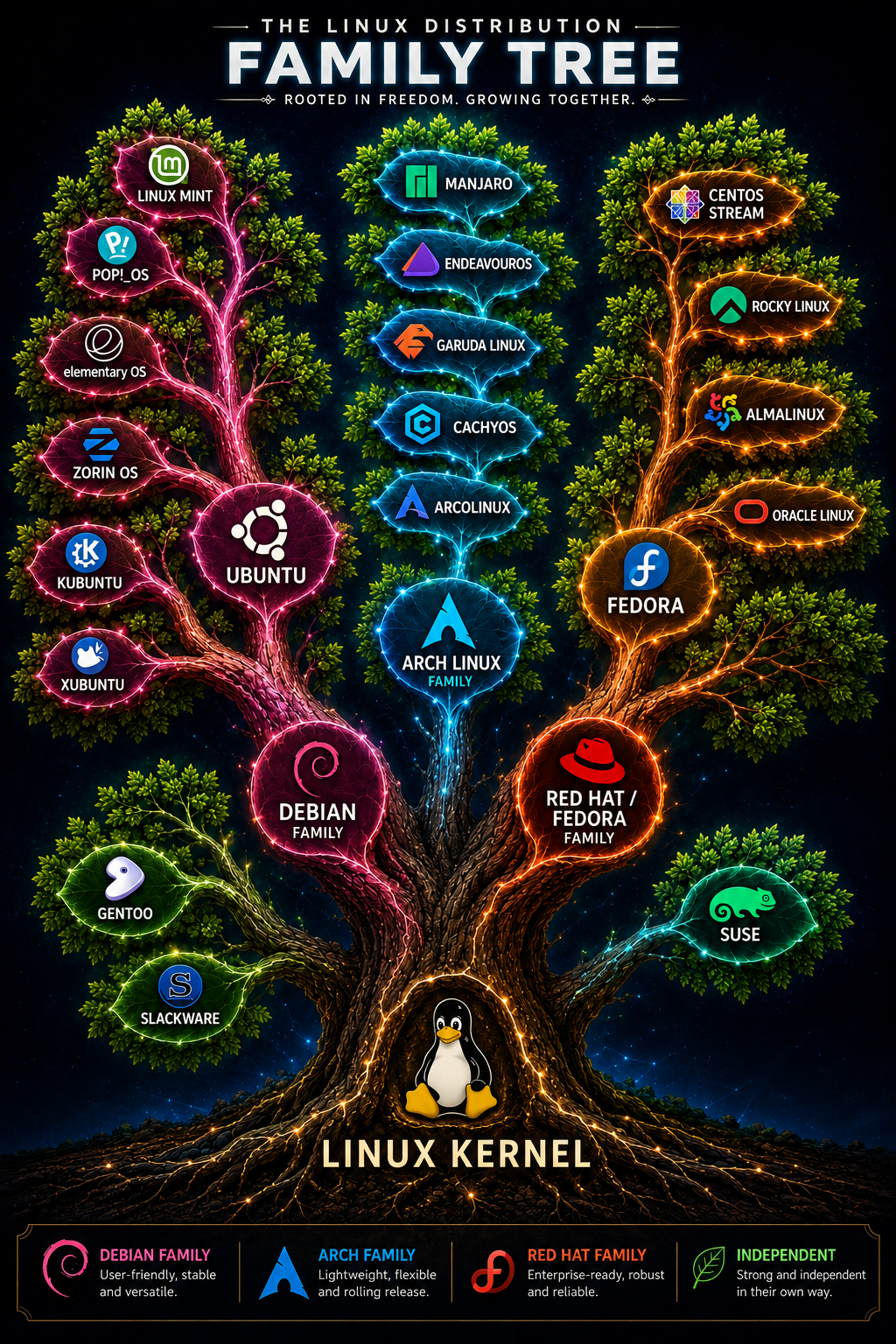
This vibrant ecosystem runs on friendly competition and collaboration. Developers are motivated not by profit or strict deadlines, but by the joy of creating software that millions of people will love and use every day. The result is continuous improvement, excellent choices for users, and an extraordinary level of freedom.
Linux as a Windows Alternative
For most people, Linux can be a smooth drop-in replacement for Windows. Once you find the apps you like and set it up, it tends to stay fast, stable, and trouble-free for many years.
At the same time, Linux is more than just an operating system — it’s a philosophy and a global community. It gives you real choice and freedom. You don’t have to dive deep into it… but you can if you want to. Many users start simple and gradually explore more over time.
Top Beginner-Friendly Distros
The following are among the most popular and approachable distros in 2026. You can try any of these with a minimum of fuss, completely free and without risk.
- Linux Mint — Best overall for Windows users. Familiar interface, very stable, and lightweight.
- Zorin OS — Modern and customizable, with one-click styles that can mimic Windows or macOS.
- Ubuntu — Most popular and well-supported, with excellent hardware compatibility.
- Pop!_OS — Great for gaming and newer hardware, especially NVIDIA graphics.
- Fedora — Modern and up-to-date, ideal for newer computers.
- Elementary OS — Clean and elegant, designed to feel like macOS.
- Manjaro — Beautiful, user-friendly, and always has the latest software.
A distro is just your starting point. Linux is extremely modular — you can add, remove, or change almost anything. With enough customization, one distro can be made to look and behave very much like another.
- CachyOS — blazing performance & gaming
- Debian — ultimate long-term stability
All distros are completely free and quick to download. Try it on a Live USB, without losing your files.
Different Desktops
The desktop environment (DE) is the user interface; the desktop. On Windows, its one immutable thing. On Linux, it's a skin, a look, that can be changed, while leaving the underlying operating system, kernel, and applications the same.
Every distro includes a desktop. Some distros favour one dektop, while others have versions for specific DEs, like a GNOME version or KDE version. Some distros build their own custom DE: Pop!_OS has Cosmic, Mint has Cinnamon. Some distros let you choose from a list of desktops during installation.
If distros are cars, then the desktop is the dashboard, the steering wheel and the pedals. Different brands have their own look and feel, but if you can drive one you can pretty much drive them all.
Here are some of the most popular desktops and what distinguishes them, but there are many more:
- Cinnamon (default in Linux Mint) — It's claim to fame is that it is great for new users coming from windows, because it is similar to Windows, with a familiar start menu, taskbar, and system tray. Cinnamon is intuitive and fast. Note, however, that it lacks some of the extra functions of GNOME and KDE, particularly RDP remote access.
- GNOME (default in Ubuntu, Fedora, Zorin, Debian) — This is the most used DE. GNOME has a unique layout and look. It is commited to keeping everything as simple, consistent and solid as possible. (this is called an "opinionated" design) It just works. GNOME is best in class, and great for touchscreen and keyboard workflows. However, some people object that it is too rigid, and not very customizable.
- KDE Plasma (default in EndeavourOS, SUSE, Garuda, CachyOS, SteamOS) — GNOME's #1 rival. KDE can do everything that GNOME can, and more. Unlike GNOME, KDE is incredibly customizable. This is a mixed blessing because while you can change everything, you can also break it. KDE can be made to look like virtually anything, and runs surprisingly light. It is not as simple or consistent as GNOME, and the menus can be confusing.
- COSMIC (new in Pop!_OS) — System76 is an American company that builds custom Linux computers. They used to ship with stock Ubuntu. Then they created their own Ubuntu derivative, called Pop!_OS, which used GNOME. More recently, they created a new desktop from scratch, and called it COSMIC. COSMIC is mostly a GNOME clone, with certain features added. COSMIC is promissing - espcially for gaming - and does some things that GNOME does not. However GNOME remains the more polished and capable overall.
- XFCE / LXQt — These desktops run extremely light and are perfect for older computers or people who want maximum speed. They are not as pretty or feature rich as larger DE's, but remain very useful and popular.
What About My Windows Programs and Compatibility?
Important note: Windows programs generally do not run on Linux. Instead, you have the following options:
- Browser apps work the same. Anything that you access through a browser, works exactly the same through a Linux browser. (Bank portal, gmail, etc)
- Run the Linux version. Some companies (ever more so) that make programs for Windows, also make a version for Linux. (example: Chrome browser)
- Run a Linux clone. Some companies do not provide a Linux version of their software. Therefore, the open source community creates a clone of that program - software that looks and functions much the same as the Windows version. (example: instead of Microsoft Office there is Libre Office.)
- Run the Windows version through a compatibility layer, or emulator. Yes, sometimes this works. Steam has been a huge success for porting windows (and other platform) games to Linux. However, more often than not, its best to use Linux native programs.
The good news is that 99% of everyday tasks are very well covered —usually with modern, free software that doesn’t require subscriptions.
Common Replacements
- Microsoft Office → LibreOffice (very good compatibility with Word, Excel, PowerPoint files)
- Adobe Photoshop → GIMP or Krita
- Outlook → Thunderbird
- Windows Media Player → VLC Media Player (plays everything)
- Chrome / Edge → Firefox (recommended) or Chrome
- OneDrive / Dropbox → Official Dropbox client or strong open-source tools
- Adobe Acrobat → LibreOffice or PDFsam
- QuickBooks → Manager.io or GnuCash
- Zoom → Official Linux version
- Microsoft Teams → Works very well as a web app (PWA) in Firefox or Chrome
- Visual Studio Code → Native Linux version
Popular apps like Spotify, Steam, Discord, Netflix, Slack, WhatsApp, and many others have excellent native Linux versions.
Other Important Compatibility Points
- File compatibility: Most common file formats (documents, photos, videos, PDFs, etc.) open and work perfectly across Windows and Linux. LibreOffice handles Microsoft Office files very reliably for everyday use.
- Web-based services: Anything that runs in a browser (Google Docs, Gmail, banking sites, Microsoft 365 web version, etc.) works exactly the same on Linux as it does on Windows.
- Printers and peripherals: Most modern printers and scanners work automatically thanks to the Linux printing system (CUPS). Plug in the device and it usually “just works.” Older or very cheap printers may need a quick driver install, but the vast majority are well supported. Wi-Fi, Bluetooth, webcams, and external drives also generally work without issues.
- Heroic Games Launcher — Easy access to Epic Games Store, GOG, and Amazon Prime Gaming.
- Lutris — Powerful tool for managing games from almost any source (including older titles and emulators).
- Native Linux games are growing fast — everything from indie gems to major releases like Counter-Strike 2, Dota 2, and many strategy/sim games.
Looking for more alternatives? AlternativeTo.net is an outstanding website to find Linux replacements for almost any Windows or Mac program.
Gaming on Linux
Modern gaming on Linux is excellent — and getting better every year. Thanks to Valve’s huge investment (and the massive success of the Steam Deck), Linux has become a legitimate first-class gaming platform.
The centerpiece is Steam, which runs natively and beautifully on Linux. With Proton (Valve’s compatibility layer), thousands of Windows games “just work” with near-native performance — often with zero tweaking. Many big titles, including AAA games, now run flawlessly. You can check compatibility at ProtonDB.com, where the community rates games from “Platinum” (works perfectly) to “Gold,” “Silver,” etc.
Popular gaming distros like Pop!_OS, Nobara, and CachyOS come with everything pre-tuned for gaming (graphics drivers, Proton-GE, etc.), so you can install Steam and start playing right away. No more dual-booting just for games.
Beyond Steam, you’ve got great options:
A few caveats for complete honesty: Some online multiplayer games with kernel-level anti-cheat (e.g., certain competitive titles) still have limited or no support. However, support is improving rapidly as more publishers add Proton compatibility. For single-player and most co-op games, you’re golden.
Bottom line: If gaming is a big part of your life, Linux is no longer a compromise. Many people now game exclusively on Linux and report smoother performance, fewer background processes, and better system stability than on Windows.
Ready to see it for yourself?